Setting Up and Securing an MCP Server in Rails
This tutorial outlines how to setup a Model Context Protocol (MCP) server within a Rails application, and how to secure it via OAuth.
- Prerequisites
- Installing the MCP Ruby Gem
- Configuring the MCP Server
- Implementing Your First Tool
- Exposing the MCP Endpoint
- Securing the Endpoint with OAuth
- Dynamic Client Registration
- Testing Our Implementation
- Next Steps
Prerequisites
- A high level understanding of the Model Context Protocol
- A Rails app setup with a
Usermodel and Devise for authentication
Installing the MCP Ruby Gem
For this tutorial we will be using the Official Ruby SDK for the Model Context Protocol.
To get started, run the following to install the mcp gem:
bundle add mcp
Configuring the MCP Server
The mcp gem provides an MCP::Server class that handles all JSON-RPC request and response processing. We will eventually be exposing this through an /mcp endpoint, but for now we will just be creating a thin wrapper around the class to allow for dynamic configuration.
Create a new file at app/lib/mcp/server.rb and add the following:
# frozen_string_literal: true

module Mcp
  class Server
    attr_reader :current_user

    delegate :handle_json, to: :mcp_server

    # @params current_user [User] Current logged in User
    #
    def initialize(current_user)
      @current_user = current_user
    end

    private

    def mcp_server
      @mcp_server ||= MCP::Server.new(
        name: "example_mcp_server",
        title: "Example MCP Server",
        version: "0.1.0",
        tools: available_tools,
        server_context: { user_id: current_user&.id }
      )
    end

    # Returns the available tools based on the current user.
    #
    # Example Implementation:
    #
    #   default_tools = [
    #     Mcp::Tools::ListTasks,
    #     Mcp::Tools::CreateTask,
    #     Mcp::Tools::ReadTask,
    #     Mcp::Tools::UpdateTask,
    #     Mcp::Tools::DeleteTask
    #   ]
    #   return default_tools unless current_user.admin?
    #
    #   admin_tools = [
    #     Mcp::Tools::CreateUser,
    #     Mcp::Tools::UpdateUser
    #   ]
    #
    #   default_tools + admin_tools
    #
    def available_tools
      [] # No tools yet
    end
  end
end
We do not yet have any tools available, we will be moving to that next.
Implementing Your First Tool
For our first tool we are going to provide a way to list users in the system. This will be a simple tool that takes no input and returns a list of users with some basic attributes.
Create a new file at app/lib/mcp/tools/list_users.rb and add the following:
# frozen_string_literal: true

module Mcp
  module Tools
    class ListUsers < MCP::Tool
      tool_name "list_users"
      title "List Users"
      description "Get a list of all registered users with basic details for each"
      annotations(
        read_only_hint: true,
        destructive_hint: false,
        idempotent_hint: true,
        open_world_hint: false
      )

      input_schema(
        type: "object",
        additionalProperties: false
      )

      output_schema(
        type: "object",
        properties: {
          users: {
            type: "array",
            items: {
              type: "object",
              properties: {
                id: {
                  type: "integer",
                  description: "User id"
                },
                email: {
                  type: "string",
                  description: "User email address"
                },
                created_at: {
                  type: "string",
                  description: "When the user was created (ISO 8601 timestamp)"
                }
              },
              required: %w[id email created_at]
            }
          }
        }
      )

      def self.call(server_context:)
        users = User.all.order(:id)
        response_data = {}
        response_data[:users] = users.map do |user|
          {
            id: user.id,
            email: user.email,
            created_at: user.created_at.to_fs(:iso8601)
          }
        end
        output_schema.validate_result(response_data)
        MCP::Tool::Response.new(
          [{ type: "text", text: response_data.to_json }],
          structured_content: response_data
        )
      end
    end
  end
end
Tool Definition
The Mcp::Tools::ListUsers class inherits from MCP::Tool which provides some class level helper methods to define the tool:
tool_name(required) - Unique identifier for the tooltitle- Display name for the tooldescription(required) - Description of the what the tool doesannotations- Additional hints to explain the behavior of the toolread_only_hint- Is the tool read onlydestructive_hint- Does the tool make destructive changesidempotent_hint- Do repeated calls produce the same final stateopen_world_hint- Does the tool interact with the external world (web search, third-party systems)
input_schema- JSON schema for the expected inputoutput_schema- JSON schema for the expected output
For tools that do not accept user input, you can omit the input_schema call completely which would give you a default of:
{ "type": "object" }
This is technically valid, but the spec recommends the following:
For tools with no parameters, use one of these valid approaches:
{ "type": "object", "additionalProperties": false }- Recommended: explicitly accepts only empty objects{ "type": "object" }- accepts any object (including with properties)
For the output_schema, the root object is required to be type: "object". That is why we are not returning an array directly.
Request Handler
The MCP::Tool base class expects you to implement a class level call method which receives the tool request and returns an instance of MCP::Tool::Response. Any properties you define in the input_schema will come through as keyword arguments, along with the server_context which has some metadata on the current request and any additional context you provided when you initialized the MCP server.
Taking a look at our example again:
def self.call(server_context:)
  users = User.all.order(:id)
  response_data = {}
  response_data[:users] = users.map do |user|
    {
      id: user.id,
      email: user.email,
      created_at: user.created_at.to_fs(:iso8601)
    }
  end
  output_schema.validate_result(response_data)
  MCP::Tool::Response.new(
    [{ type: "text", text: response_data.to_json }],
    structured_content: response_data
  )
end
We are loading all user records and mapping them into a hash with the attributes we want to expose. In a real world scenario this would be paginated, but to keep things simple we are just returning everything.
After we have our response data we then call:
output_schema.validate_result(response_data)
Which will raise a validation error and return an error response if our data doesn’t align with our output schema.
Tool Response
If the response data is valid, we then construct an MCP::Tool::Response:
MCP::Tool::Response.new(
  [{ type: "text", text: response_data.to_json }],
  structured_content: response_data
)
MCP servers can respond with a combination of structured and unstructured content. The first argument that is passed to the tool response is a collection of unstructured content with support for various types. In our case we are just returning a text representation of our JSON data.
Structured content is provided separately by utilizing the structured_content keyword and passing the response object.
Technically we could omit the unstructured content, but it is recommended to also include it for backwards compatibility:
For backwards compatibility, a tool that returns structured content SHOULD also return the serialized JSON in a TextContent block.
Error Handling
If there is an issue with the request and you need to return an error, the response is built in exactly the same way, but with the addition of the error: true key:
MCP::Tool::Response.new(
  [{ type: "text", text: "User not found" }],
  error: true
)
structured_content is always expected to conform to the output schema, so in most cases it is omitted in error responses.
Adding the Tool to the Server
After you have the tool setup, update the Mcp::Server class to include it in the available_tools list:
# app/lib/mcp/server.rb
def available_tools
  [Mcp::Tools::ListUsers] # <-- Add your tools here
end
Exposing the MCP Endpoint
Now that we have our server setup with an available tool, we need to expose an MCP endpoint for clients to connect to.
We will be using the Streamable HTTP transport for our server, and will not be supporting SSE (Server Sent Events). For simplicity, our implementation will follow a basic request/response pattern, returning exactly one JSON response per request.
According to the MCP Spec, when using the Streamable HTTP transport:
The server MUST provide a single HTTP endpoint path (hereafter referred to as the MCP endpoint) that supports both POST and GET methods.
To configure this in our app, update your config/routes.rb file with the following:
match "mcp", to: "mcp#invoke", via: [:get, :post], format: :json, as: :mcp
This provides an /mcp endpoint that accepts both GET and POST requests and routes them to the McpController#invoke method which we will create next.
Create a new file at app/controllers/mcp_controller.rb and add the following:
# frozen_string_literal: true

class McpController < ApplicationController
  skip_forgery_protection
  before_action :ensure_post!

  # POST /mcp
  #
  def invoke
    mcp_response = mcp_server.handle_json(request.raw_post)

    if mcp_response.present?
      render json: mcp_response
    else
      head :accepted # Expected response for notifications
    end
  end

  private

  def mcp_server
    @mcp_server ||= Mcp::Server.new(nil) # Set current_user to nil for now
  end

  # GET requests are only used for SSE (not supported)
  #
  def ensure_post!
    return if request.post?

    response.set_header("Allow", "POST")
    head :method_not_allowed
  end
end
The McpController#invoke action is just relaying requests to our Mcp::Server instance and returning the response.
Because we are not supporting SSE, we need to explicitly respond to GET requests with a 405 Method Not Allowed status code:
The server MUST either return
Content-Type: text/event-streamin response to this HTTP GET, or else return HTTP 405 Method Not Allowed, indicating that the server does not offer an SSE stream at this endpoint.
At this point our MCP server is working and available to connect to from any MCP client that will accept local connections.
For example you could configure a connection to the server in Codex CLI by executing the following:
codex mcp add example_mcp --url http://localhost:3000/mcp
Securing the Endpoint with OAuth
We now have a working MCP server but the /mcp endpoint is completely public. We will move next into securing this endpoint using OAuth.
Installing Doorkeeper
Doorkeeper is a ruby gem that adds OAuth 2 provider functionality to a Rails app.
To get started run the following:
bundle add doorkeeper
bundle exec rails g doorkeeper:install
The doorkeeper:install generator will perform the following changes:
- Create a new initializer in
config/initializers/doorkeeper.rb - Add doorkeeper’s routes to
config/routes.rb - Create a new locale file in
config/locales/doorkeeper.en.yml
We then need to run the migration generators to setup our OAuth tables:
bundle exec rails g doorkeeper:migration
bundle exec rails g doorkeeper:application_owner
bundle exec rails g doorkeeper:pkce
This will generate 3 migrations:
*_create_doorkeeper_tables.rb- Creates theoauth_applications,oauth_access_grantsandoauth_access_tokenstables with some common defaults (we will be adjusting this slightly in the next section)*_add_owner_to_application.rb- Addsowner_idandowner_typeto theoauth_applicationstable*_enable_pkce.rb- Adds PKCE support to theoauth_access_grantstable, this is required by MCP when using OAuth
DO NOT run the migrations yet, we will be adjusting them in the next section.
Configuring Doorkeeper
Update config/initializers/doorkeeper.rb with the following:
# frozen_string_literal: true

Doorkeeper.configure do
  orm :active_record

  # This block will be called to check whether the resource owner is authenticated or not.
  resource_owner_authenticator do
    current_user || warden.authenticate!(scope: :user)
  end

  # Authorization Code expiration time (default: 10 minutes).
  #
  authorization_code_expires_in 10.minutes

  # Access token expiration time (default: 2 hours).
  #
  access_token_expires_in 2.hours

  # Require non-confidential clients to use PKCE when using an authorization code
  # to obtain an access_token (disabled by default)
  #
  force_pkce

  # Enforce PKCE using SHA-256 only (disables "plain").
  # S256 prevents the code_verifier from being exposed in the auth request
  # and aligns with OAuth security best practices.
  #
  pkce_code_challenge_methods ["S256"]

  # Hash access and refresh tokens before persisting them.
  #
  hash_token_secrets

  # Hash application secrets before persisting them.
  #
  hash_application_secrets

  # Issue access tokens with refresh token (disabled by default), you may also
  # pass a block which accepts `context` to customize when to give a refresh
  # token or not. Similar to +custom_access_token_expires_in+, `context` has
  # the following properties:
  #
  # `client` - the OAuth client application (see Doorkeeper::OAuth::Client)
  # `grant_type` - the grant type of the request (see Doorkeeper::OAuth)
  # `scopes` - the requested scopes (see Doorkeeper::OAuth::Scopes)
  #
  use_refresh_token

  # Provide support for an owner to be assigned to each registered application
  #
  enable_application_owner

  # Define access token scopes for your provider
  # For more information go to
  # https://doorkeeper.gitbook.io/guides/ruby-on-rails/scopes
  #
  default_scopes "mcp:access"

  # Forbids creating/updating applications with arbitrary scopes that are
  # not in configuration, i.e. +default_scopes+ or +optional_scopes+.
  # (disabled by default)
  #
  enforce_configured_scopes

  # Forces the usage of the HTTPS protocol in non-native redirect uris (enabled
  # by default in non-development environments). OAuth2 delegates security in
  # communication to the HTTPS protocol so it is wise to keep this enabled.
  #
  force_ssl_in_redirect_uri do |uri|
    # Only allow HTTP for loopback (CLI tools)
    loopback_hosts = %w[localhost 127.0.0.1 ::1]
    !loopback_hosts.include?(uri.host)
  end

  # Specify what grant flows are enabled in array of Strings. The valid
  # strings and the flows they enable are:
  #
  # "authorization_code" => Authorization Code Grant Flow
  # "implicit"           => Implicit Grant Flow
  # "password"           => Resource Owner Password Credentials Grant Flow
  # "client_credentials" => Client Credentials Grant Flow
  #
  grant_flows %w[authorization_code]

  # WWW-Authenticate Realm (default: "Doorkeeper").
  #
  realm "OAuth"
end
There are many more config options, but this will give us a solid setup for use with MCP.
One notable callout is we are only configuring a single mcp:access scope here, instead of granular resource based scopes. We are assuming if mcp:access is granted, the client is able to act on the behalf of the authenticated user for any tool that is available.
Preparing the Migrations
Update the *_create_doorkeeper_tables.rb migration file with the following changes:
- Remove the
null: falseoption from theoauth_applications.secretcolumn - Remove the
previous_refresh_tokencolumn from theoauth_access_tokenstable - This will cause refresh tokens to expire as soon as a new one is issued - Remove the SQLServer conditional for creating the
refresh_tokenindex - Uncomment the
resource_owner_idforeign keys, and link them to theuserstable
The migration should look like the following:
# frozen_string_literal: true

class CreateDoorkeeperTables < ActiveRecord::Migration[8.1]
  def change
    create_table :oauth_applications do |t|
      t.string  :name,    null: false
      t.string  :uid,     null: false
      t.string  :secret
      t.text    :redirect_uri, null: false
      t.string  :scopes,       null: false, default: ''
      t.boolean :confidential, null: false, default: true
      t.timestamps             null: false
    end

    add_index :oauth_applications, :uid, unique: true

    create_table :oauth_access_grants do |t|
      t.references :resource_owner,  null: false
      t.references :application,     null: false
      t.string   :token,             null: false
      t.integer  :expires_in,        null: false
      t.text     :redirect_uri,      null: false
      t.string   :scopes,            null: false, default: ''
      t.datetime :created_at,        null: false
      t.datetime :revoked_at
    end

    add_index :oauth_access_grants, :token, unique: true
    add_foreign_key(
      :oauth_access_grants,
      :oauth_applications,
      column: :application_id
    )

    create_table :oauth_access_tokens do |t|
      t.references :resource_owner, index: true
      t.references :application,    null: false
      t.string :token, null: false
      t.string   :refresh_token
      t.integer  :expires_in
      t.string   :scopes
      t.datetime :created_at, null: false
      t.datetime :revoked_at
    end

    add_index :oauth_access_tokens, :token, unique: true
    add_index :oauth_access_tokens, :refresh_token, unique: true

    add_foreign_key(
      :oauth_access_tokens,
      :oauth_applications,
      column: :application_id
    )

    add_foreign_key :oauth_access_grants, :users, column: :resource_owner_id
    add_foreign_key :oauth_access_tokens, :users, column: :resource_owner_id
  end
end
Make the changes directly to your generated migration file rather than copying what is above. The base class of the migration is configured specifically for your current rails version.
No changes are necessary for the *_enable_pkce.rb and *_add_owner_to_application.rb migration files.
After you have made your updates, apply the migrations:
bundle exec rails db:migrate
Restrict Access
We can now enforce doorkeeper authorization within our McpController to only permit authenticated users:
 class McpController < ApplicationController
   skip_forgery_protection
   before_action :ensure_post!
+  before_action -> { doorkeeper_authorize! "mcp:access" }

   # POST /mcp
   def invoke
@@ -20,7 +21,11 @@ class McpController < ApplicationController
   private

   def mcp_server
-    @mcp_server ||= Mcp::Server.new(nil) # Set current_user to nil for now
+    @mcp_server ||= Mcp::Server.new(current_user)
+  end
+
+  def current_user
+    @current_user ||= User.find(doorkeeper_token.resource_owner_id)
   end

   # GET requests are only used for SSE (not supported)
We also updated our mcp_server instance to be initialized with the current user so this context is available to tools.
Dynamic Client Registration
Our /mcp endpoint is now secured. However, in order for a client to connect, a user must manually register an OAuth application and configure the MCP connection with its client_id.
This may work for your use case, and if it does you can skip this section, but the most common way currently for MCP clients to authenticate using OAuth is for the MCP server to support Dynamic Client Registration (DCR).
DCR allows the MCP client to dynamically discover a service’s OAuth registration endpoint and register a new application as needed. This approach allows you to provide your end users with a single URL for connecting to your MCP server, and the client handles the rest.
To implement this functionality we will need to add a client registration endpoint and two metadata endpoints to instruct the client how to authenticate.
Client Registration Endpoint
Update your config/routes.rb file with the following:
namespace :oauth do
  resources :registrations, only: :create, format: :json
end
This will give us a single POST /oauth/registrations endpoint that we can provide to MCP clients for registration.
Next we will create the associated controller to handle the request.
Create a new file at app/controllers/oauth/registrations_controller.rb and add the following:
# frozen_string_literal: true

module Oauth
  class RegistrationsController < ApplicationController
    skip_forgery_protection
    wrap_parameters :oauth_application
    rate_limit to: 5, within: 1.minute, name: "per-minute", with: :rate_limit_exceeded
    rate_limit to: 50, within: 1.day, name: "per-day", with: :rate_limit_exceeded

    # POST /oauth/registrations
    #
    def create
      application = Doorkeeper::Application.new(
        name: oauth_application_params[:client_name],
        redirect_uri: oauth_application_params[:redirect_uris],
        confidential: false
      )
      if application.save
        render json: {
          client_name: application.name,
          client_id: application.uid,
          client_id_issued_at: application.created_at.to_i,
          redirect_uris: application.redirect_uri.split
        }, status: :created
      else
        render json: {
          error: "invalid_client_metadata",
          error_description: application.errors.full_messages.join(", ")
        }, status: :bad_request
      end
    end

    private

    def oauth_application_params
      params.expect(
        oauth_application: [
          :client_name,
          redirect_uris: []
        ]
      )
    end

    def rate_limit_exceeded
      render json: {
        error: "rate_limit_exceeded",
        message: "Too many requests. Try again later."
      }, status: :too_many_requests
    end
  end
end
The create action accepts a JSON payload containing client_name and redirect_uris, creates a new Doorkeeper::Application, and returns the issued client_id in the response.
These applications are created as “public clients” (confidential: false), meaning we do not provide a client secret, and rely on access being granted through an associated user.
We also applied some rate limiting here. This endpoint is open to the public so it could potentially become a target for abuse.
OAuth Metadata Endpoints
The MCP Spec requires certain OAuth metadata endpoints to exist so that clients can discover authorization servers and determine supported capabilities.
According to MCP Spec:
MCP servers MUST implement the OAuth 2.0 Protected Resource Metadata (RFC9728) specification to indicate the locations of authorization servers. The Protected Resource Metadata document returned by the MCP server MUST include the
authorization_serversfield containing at least one authorization server.
MCP clients use the protected resource metadata to identify which authorization servers are trusted by the MCP server to issue access tokens.
The client then retrieves the authorization server’s metadata to discover its OAuth capabilities and the endpoints required to complete the OAuth flow.
Because our app is acting as both the protected resource and the authorization server, we will need to implement both of these metadata endpoints.
Update your config/routes.rb with the following:
get ".well-known/oauth-protected-resource", to: "oauth/metadata#protected_resource"
get ".well-known/oauth-protected-resource/mcp", to: "oauth/metadata#protected_resource"
get ".well-known/oauth-authorization-server", to: "oauth/metadata#authorization_server"
get ".well-known/oauth-authorization-server/mcp", to: "oauth/metadata#authorization_server"
These are “Well-Known URIs”, meaning they are standard paths that the client will attempt to request metadata from without us needing to instruct it further. We included variations of the paths with /mcp appended to the end to help with discovery.
Next we are going to implement the Oauth::MetadataController to handle these requests.
Create a new file at app/controllers/oauth/metadata_controller.rb and add the following:
# frozen_string_literal: true

module Oauth
  class MetadataController < ApplicationController
    #
    # GET /.well-known/oauth-authorization-server
    #
    def authorization_server
      render json: {
        issuer: request.base_url,
        authorization_endpoint: oauth_authorization_url,
        token_endpoint: oauth_token_url,
        registration_endpoint: oauth_registrations_url,
        revocation_endpoint: oauth_revoke_url,
        introspection_endpoint: oauth_introspect_url,
        response_types_supported: ["code"],
        grant_types_supported: ["authorization_code", "refresh_token"],
        token_endpoint_auth_methods_supported: ["none"],
        scopes_supported: ["mcp:access"],
        code_challenge_methods_supported: ["S256"]
      }
    end

    # GET /.well-known/oauth-protected-resource
    #
    def protected_resource
      render json: {
        resource: mcp_url,
        resource_name: "Example MCP Server",
        authorization_servers: [request.base_url],
        bearer_methods_supported: ["header"],
        scopes_supported: ["mcp:access"]
      }
    end
  end
end
These are just simple GET requests that return JSON data.
What we have above should be sufficient for our needs but if you want to dig into what each of the fields in the responses is used for, see the following:
- RFC9728 Section 3.2 “Protected Resource Metadata Response”
- RFC8481 Section 3.2 “Authorization Server Metadata Response”
Testing Our Implementation
Now that our MCP server supports DCR and has all the necessary OAuth metadata endpoints, we have everything we need for MCP clients to discover and authenticate with our server. To test our implementation we are going to be using MCP Inspector, a browser-based tool that runs locally, allowing us to connect to our server, authenticate, execute tools, and inspect requests and responses being exchanged.
CORS
Because MCP Inspector is a browser based tool, we will need to add some Cross-Origin Resource Sharing (CORS) settings to our app to allow the browser to make cross origin requests to our server.
We will be using the rack-cors gem for this purpose.
First, add the rack-cors gem to your app by running the following:
bundle add rack-cors --group development
We are only interested in our CORS settings being applied in our development environment, once our MCP server is live we can use the MCP Inspector in Proxy mode to bypass the CORS restrictions.
Next, create a new file at config/initializers/cors.rb and add the following:
# frozen_string_literal: true

if Rails.env.development?
  Rails.application.config.middleware.insert_before 0, Rack::Cors do
    allow do
      origins "*"
      resource "*", headers: :any, methods: [:get, :post]
    end
  end
end
This will allow the MCP Inspector (or any other browser-based tool), to make GET and POST requests to any endpoint in our rails app, with any headers. This is fine for development but should not be used in production.
Restart your rails server to apply the changes.
MCP Inspector
Now that our app has the necessary CORS config applied, we can run the inspector:
npx @modelcontextprotocol/inspector
This will open a browser with the MCP Inspector tool running locally:
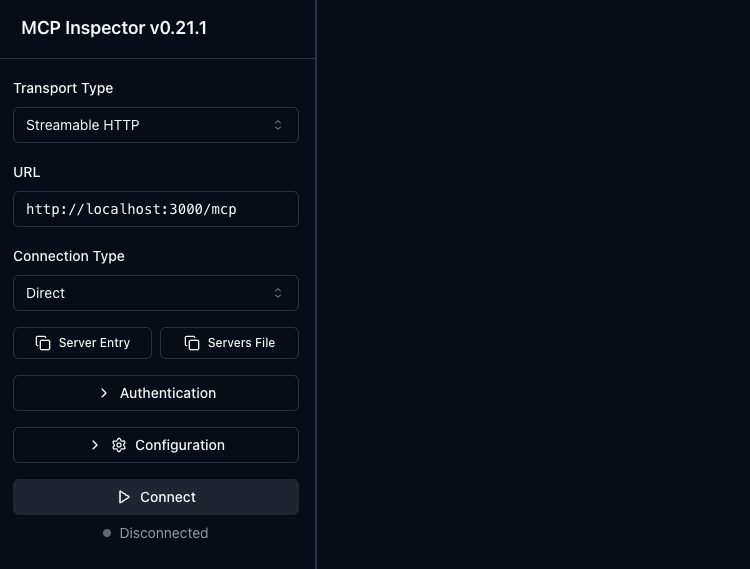
Next, update the MCP Inspector URL to http://localhost:3000/mcp, ensure the “Connection Type” is set to “Direct”, and click “Connect”.
This should take you through the OAuth flow in your app and redirect you back to the MCP Inspector after you have authorized the connection.
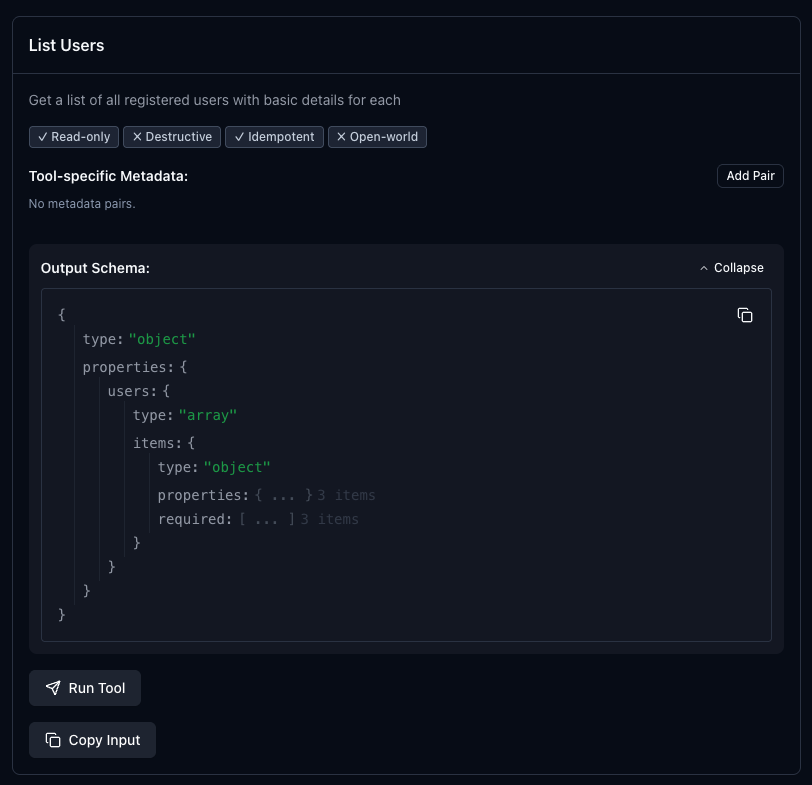
If you then click the “Tools” tab and click “List Tools” you should see your tool listed with all of your configuration details:
If everything looks good, you can add the MCP server to other MCP clients for further testing.
To use the server in Codex CLI you can again execute the codex mcp add command that we ran earlier, but this time it should guide you through the OAuth flow:
codex mcp add example_mcp --url http://localhost:3000/mcp
Next Steps
Additional DCR Protections
Since the Dynamic Client Registration endpoint is open to the public, additional measures should taken to protect your application. We applied simple rate limiting at the controller level but this is still open to abuse.
Consider the following:
- Enforce a maximum request body size
- Allowlist only known MCP client profiles
- Apply IP reputation and ASN filtering
- Clean up inactive applications after a defined period
- Monitor abnormal registration patterns
Client ID Metadata Documents
There is an emerging standard for client registration for MCP servers called Client ID Metadata Documents (CIMD). In this scenario a URL is used by the MCP client as the OAuth client_id and the MCP server uses this URL to obtain metadata for the client (name, redirect uris, etc).
This is currently the recommended approach in the latest MCP spec and is preferred over DCR. However, adoption has been very slow on both the client and server side, and particularly for CLI tools, DCR remains the standard.
If you want to future proof your implementation, take the time and implement CIMD as well.
Here are some good resources to learn more: